
Website Works, but Login and Payments Fail – What Happens Behind the Scenes?
A homepage that loads tells you surprisingly little about the health of a web application. The page you see may come from a CDN cache, a static file server or a frontend that never touches the systems that verify passwords, store sessions or move money. When login or checkout breaks while everything else looks fine, the cause is usually a partial failure: one dependency in a specific user journey is slow, unreachable or rejecting requests, and the rest of the stack keeps working.
Understanding that gap between “the site is up” and “the service works” is one of the most useful mental models in web operations. It changes how teams monitor, how they diagnose, and how they talk to users while an incident is still unfolding.

Understanding that gap between “the site is up” and “the service works” is one of the most useful mental models in web operations. It changes how teams monitor, how they diagnose, and how they talk to users while an incident is still unfolding.
Why the Homepage Is a Poor Health Check
The frontend can be served without the backend
Modern sites are layered. A CDN or reverse proxy sits at the edge and caches static assets, and often whole pages. The application tier behind it renders dynamic content and calls internal and external APIs. Databases, caches, queues and third-party services sit further back.
A request for the homepage may stop at the first layer. If the HTML is cached at the edge, the origin server does not need to respond at all. Even when the origin renders the page, it may only read cached marketing content and never touch the authentication service or the payment integration.
A login request is different. It usually travels:
through the edge and any bot-protection layer;
to an application endpoint;
to an identity service or internal auth module;
to a user database or directory;
possibly to a multi-factor provider;
and finally back to the browser, which must accept and store a session cookie or token.
Any one of these hops can fail while the homepage stays perfectly green.
Availability is not a single number
Treat availability as a property of each user journey, not of the domain. “Browse”, “log in”, “deposit”, “withdraw” and “view account history” each depend on a different set of components. A dashboard showing 100% uptime for the root URL can coexist with a login success rate that has collapsed.
The Components That Fail Quietly
Authentication services
Authentication may run inside the main application or be delegated to a separate identity provider using OpenID Connect or SAML. Delegation adds network calls, token validation and clock-sensitive signatures. An expired signing key, an unreachable discovery endpoint or a clock skew between servers can break login without touching anything else.
Session management
After a successful login, the application must create and persist a session. Server-side sessions often live in a cache such as Redis or in a database. If that store is full, unreachable or failing over, users may authenticate successfully and then be logged straight back out. That looks like a password problem, but it isn’t. Token-based designs move this burden elsewhere, but still depend on correct signing keys and expiry handling.
Database connectivity
Read-heavy pages can be served from replicas or caches. Account actions often need the primary database. Connection pool exhaustion, lock contention, a slow migration or a replication failover can therefore make writes fail while reads still succeed.
API dependencies and third parties
Account pages may depend on internal microservices for balances, limits, notifications and loyalty points. Regulated or risk-sensitive services may also call external identity verification, fraud scoring or geolocation providers. If one of these times out and the code does not fail gracefully, the whole journey stops.
Payment gateways
Payments typically involve the merchant’s backend, a payment service provider, card networks or banking rails, and sometimes 3-D Secure challenges in the browser. Each hop has its own latency and failure modes. A gateway can be slow without being down, and slow is often worse, because it triggers timeouts that leave the outcome ambiguous.
DNS and network routing
Internal services often reach each other through separate DNS names, private networks or service meshes. A DNS change, an expired certificate on an internal endpoint or a routing problem in one region can break a specific API while the public site still resolves correctly.
CDN caching
Caching hides problems as well as load. If the origin goes down, a CDN configured to serve stale content can keep the homepage visible for a while. Dynamic endpoints such as login and checkout are rightly excluded from caching, so they fail immediately.
DDoS protection and bot management
Edge protection may present JavaScript challenges, CAPTCHAs or block requests outright. Rules tuned too aggressively can block legitimate login attempts, especially from mobile networks or shared IP addresses, while leaving ordinary page views untouched.
Rate limiting
Login and payment endpoints are commonly rate-limited to reduce credential stuffing and abuse. The HTTP status 429 Too Many Requests, often with a Retry-After header, signals this. A misconfigured limit, or many users behind the same NAT, can make legitimate users look like attackers.
Infrastructure outages
Cloud regions, availability zones, managed databases and queueing services all have partial outages. A service deployed in a single zone, or depending on one regional managed component, may lose only the features that rely on that component.
Not Every Failed Login Is an Outage
It is tempting to blame the servers. In practice, many login problems are local or account-specific. Distinguishing them early saves time and avoids unnecessary escalation.
Incorrect credentials. The authentication service is healthy and is correctly rejecting the request. Error rates for this cause are usually stable over time.
Expired sessions. The user was logged in, but the session or token has expired, sometimes during a long form or payment flow.
Authentication service outage. Many users across networks fail at the same step at the same time, often with 5xx responses or timeouts.
Account restrictions. The account is locked, suspended or awaiting verification. The system is working as designed, even if the message is unclear.
Bot-protection challenges. Edge rules block or challenge the request before it reaches the application. Users with privacy extensions, VPNs or unusual networks are affected first.
MFA failures. One-time codes fail because of device clock drift, SMS delivery delays or problems with the MFA provider.
Browser cookie problems. Third-party cookie blocking, SameSite attributes, or a browser refusing a cookie marked Secure on a non-HTTPS path can prevent the session from sticking. MDN’s documentation on cookies and the SameSite attribute is a good reference for these cases.
Backend timeouts. The request reaches the application, but a downstream call takes too long. Users typically see a spinner, then a generic error.
When users run searches like Westio login after being unable to get in, the answer often lies in this list: a cookie blocked by the browser, an expired session, a verification step or an edge challenge, rather than an infrastructure fault. On risk-sensitive platforms, account protections are deliberately strict. The right diagnosis starts with the user’s specific error and environment, not with an assumption about the servers.
Why Payments Are Uniquely Tricky
Authorisation, capture and settlement
A card payment is not a single event. Authorisation asks the issuer to approve and reserve funds. Capture asks for those funds to be collected. Settlement moves the money between institutions, often hours or days later. Bank transfers and wallets follow their own models. A user may see an authorisation hold on their account while the merchant’s system shows no completed transaction.
Timeouts do not mean failure
If the merchant’s backend sends a request to the gateway and the connection times out, the request may still have been received and processed. The interface shows an error, but the payment may have been initiated, authorised or even completed. This is the most important principle in payment troubleshooting: an error on screen is not proof that nothing happened.
Asynchronous processing and pending states
Many payment providers confirm outcomes asynchronously through webhooks or status polling. A well-designed system records a transaction as pending, waits for a definitive event and only then credits or debits the account. Pending is a legitimate state, not a bug. The problem arises when pending states are never resolved because webhooks fail, are rejected or are processed out of order.
Idempotency and duplicate prevention
Payment APIs commonly support idempotency keys: a unique identifier attached to a request so that retrying it does not create a second charge. If the first attempt succeeded, the provider returns the original result instead of processing again. Without idempotency, a user refreshing a slow checkout or a client retrying automatically can create duplicate transactions.
Reconciliation
Reconciliation compares the merchant’s internal records with provider reports and settlement files. It is how teams detect payments that succeeded at the provider but were never recorded locally, or the reverse. After any payment incident, reconciliation is not optional. It is how affected users are identified and made whole.
Five Kinds of “Working”
A useful way to structure monitoring is to separate five properties that are often merged:
Site availability. Can the public pages be fetched? Measured with simple HTTP probes and CDN analytics.
Login availability. Can a real user authenticate and keep a session? Measured with synthetic login journeys using test accounts and with authentication success and error rates.
Payment availability. Can a payment be submitted and receive a response within an acceptable time? Measured through gateway latency, error rates and provider status.
Transaction finality. Has a payment reached a definitive state: succeeded, failed or reversed? Measured by tracking pending transactions and their age, and by webhook delivery health.
Data consistency. Do internal records, user balances and provider records agree? Measured through reconciliation jobs and consistency checks between systems.
Each requires different signals. A team that only watches the first will discover problems with the other four from support tickets.
SymptomLikely technical causeHomepage loads, login spins then errorsAuth service or database timeoutLogin succeeds, user immediately logged outSession store failure or cookie rejectedMany users get 429 at loginRate limit or bot rule too aggressivePayment shows error, bank shows holdGateway timeout after authorisationPayment stuck as pendingWebhook delivery or processing failureBalances disagree with provider reportsReconciliation gap or partial write
A Hypothetical Incident
The following scenario is fictional and is used purely for illustration.
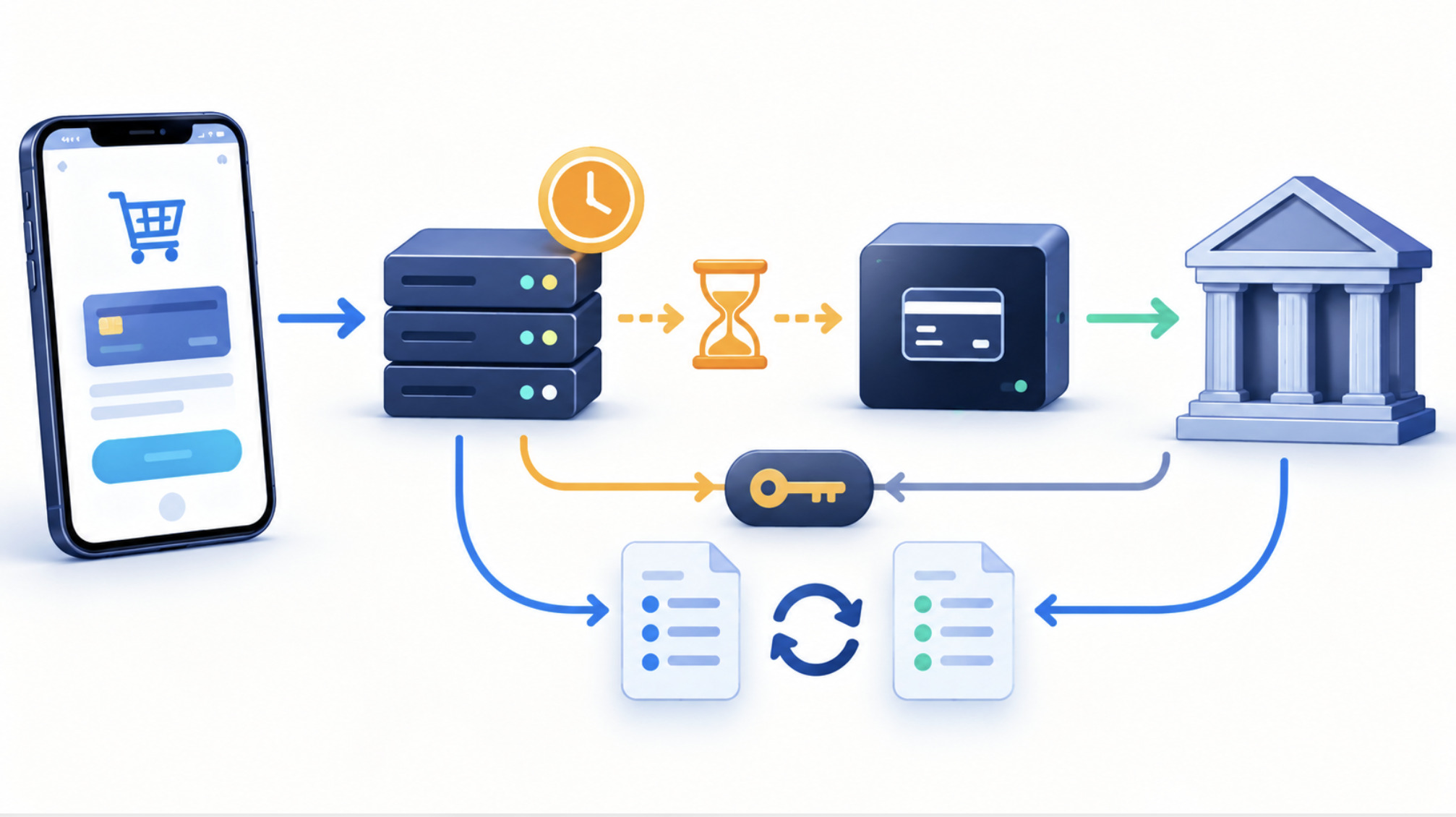
On a busy Friday evening, an online service sees support tickets rise. The homepage loads normally and the uptime monitor shows green. Users report that login spins, and some who are already logged in say deposits show an error.
Tracing reveals that a routine deployment an hour earlier changed the database connection pool settings for the account service. Under evening load, the pool is exhausted. Login queries wait, then time out. The payment service, which writes transaction records through the same account service, receives the gateway’s authorisation response but cannot write it locally before its own timeout. Users see an error, but the gateway has authorised many of those payments.
The team rolls back the deployment, and login recovers within minutes. Payments then require reconciliation: engineers compare gateway records with internal pending transactions, complete the legitimate ones and void authorisations that will not be captured. Users receive a clear notice explaining that some payments may show a temporary hold and that no action is required. The post-incident review adds a synthetic login check, pool-saturation alerts and a canary rollout for configuration changes.
Diagnosing Partial Failures Safely
Signals worth watching
HTTP status codes. Rising 502, 503 and 504 responses on specific endpoints point to upstream failures, 401 and 403 to authorisation issues, and 429 to rate limiting.
Application logs. Look for timeouts, connection errors and unhandled exceptions, correlated by request ID.
Server metrics. CPU, memory, file descriptors and thread pools on the services involved.
Database monitoring. Connection counts, slow queries, lock waits and replication lag.
Distributed tracing. Shows where in a multi-hop request the time is spent.
API latency. Track percentiles, not just averages. A healthy average can hide a failing tail.
Authentication error rates. Separated by error type, so that invalid passwords are not confused with timeouts.
Payment processing logs. Provider response codes, webhook receipts and idempotency key usage.
Synthetic monitoring. Scripted journeys that log in and walk through key flows with test accounts.
Diagnostics that create new risks
OWASP guidance on logging is explicit: logs must not contain passwords, session tokens, full card numbers or other sensitive data. During an incident, avoid turning on verbose debug logging that captures request bodies in production, copying raw logs into public chat channels or tickets, and sharing user identifiers outside the incident team. Access to production diagnostics should be limited and audited.
An Incident Response Sequence
Confirm the affected user journey. Identify exactly what fails, such as login, deposit or account view, and at which step.
Determine whether the problem is local or widespread. Compare error rates across regions, networks, browsers and apps. A single user’s problem is handled differently from a systemic one.
Inspect authentication dependencies. Identity provider, session store, MFA provider, signing keys and edge security rules.
Check API and database health. Latency, error rates, connection pools and replication.
Inspect payment processor status. Provider status pages, gateway response times and webhook delivery.
Review recent deployments. Code, configuration, infrastructure and edge rule changes are the most common triggers. Roll back where it is safe.
Communicate clearly with users. Say which functions are affected, whether funds are safe, and whether users should avoid retrying payments.
Restore services and reconcile affected transactions. Recovery is not complete until every pending or ambiguous payment reaches a final state.
Conduct a post-incident review. Focus on the system, not individuals: detection gaps, missing safeguards and follow-up actions.
Security Lines Not to Cross Under Pressure
Incidents create pressure to restore access quickly. Some shortcuts create bigger problems than the outage itself:
Do not disable authentication protections such as MFA, rate limiting or bot controls just to make login work. Attackers watch for exactly these moments.
Do not expose sensitive logs to third parties or public channels.
Do not retry financial operations blindly. Retry only with idempotency keys and after checking the provider’s record.
Do not bypass transaction validation to clear a backlog.
Do not weaken anti-fraud controls to reduce false positives during an incident without a deliberate, documented decision.
Do not publish private customer information in status updates or incident reports.
A working homepage only shows that one layer of the system is healthy. Login, payments and account data each depend on their own chain of services, and each chain deserves its own monitoring, its own diagnostics and its own recovery plan.